Wallpanel S5
NewsWallpanel S5 joins the lineup. What changed in Wallpanel OS 0.0.8 – 0.0.10?
Meet the compact Wallpanel S5 and explore the performance, boot visuals, audio, backlight and app changes in the latest Wallpanel OS releases.
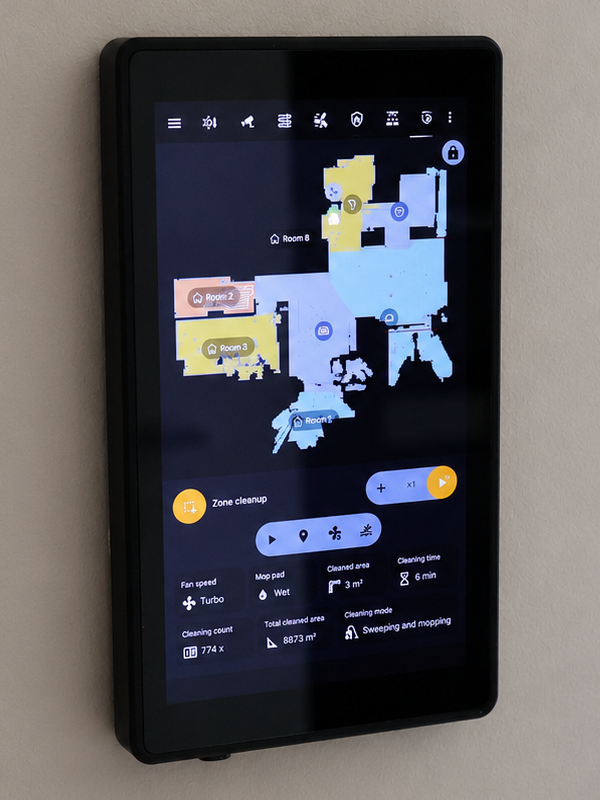
The Wallpanel range has a new member. Wallpanel S5 is now available alongside S8 and S10 as the smallest wall panel offered by emel.tech.
It is designed for spaces where a full-size dashboard is unnecessary, but quick Home Assistant access, permanent power and a clean wall-mounted installation still matter.
The smallest model in the Wallpanel range
Wallpanel S5 features a portrait 5.5-inch IPS display with a resolution of 720 × 1200 px. Its 145.7 × 84 × 11 mm enclosure makes it a natural fit for entryways, hallways, smaller rooms and focused control points built around a few essential functions.
The portrait layout works well for key scenes, alarm status, lighting, temperature or a single device. S5 can serve as an additional panel around the home, complementing the larger S8 and S10 models.
A compact panel with the same system foundation
The smaller enclosure still provides the core elements of the Wallpanel platform:
- an 8-core processor, 4 GB of RAM and 32 GB of storage;
- PoE or DC 12–24 V power;
- Wi-Fi, Bluetooth 5.2, a microphone, speaker and SD card slot;
- Android 14/AOSP with Wallpanel OS;
- OTA updates and app installation through APK files, F-Droid and a custom repository;
- a set prepared for wall mounting.
Like the other models, S5 is designed first and foremost as a permanently powered Home Assistant panel. It is not a standard tablet placed in a wall holder, but a device built around a specific operating model.
Availability and frame options
Wallpanel S5 is priced at 1199 PLN including VAT for customers in Poland and 239 EUR for supported international B2B orders.
The black frame is handled through the normal in-stock or made-to-order flow. Silver remains a special-batch option and is produced once sufficient demand has been collected.
Wallpanel OS 0.0.8: more accurate performance management
Version 0.0.7 introduced adaptive performance boosts, covered in more detail in What makes Wallpanel OS different from standard Android?. Version 0.0.8 substantially refined that mechanism.
The main technical changes include:
- moving process profiles from the older
schedtunecontroller to modern CPU groups; - correctly assigning the foreground application process to the
top-appgroup; - lowering the aggregate CPU load threshold from 25% to 15%;
- adding a separate 50% threshold for an individual CPU core;
- sampling the workload while a boost is still active rather than only after it ends;
- retaining a high-load event between consecutive samples.
The most important practical improvement concerns single-threaded workloads. WebView can place heavy demand on one core while the average load across the entire eight-core processor remains relatively low. The previous algorithm could therefore end the boost too early.
The new mechanism responds earlier and more accurately to the actual workload. This should result in smoother Home Assistant dashboard scrolling, faster interface response and fewer interruptions during demanding rendering. Frequency limits are restored automatically after the load drops, so the higher performance state remains active only when it is useful.
New boot visuals and full S5 support
Wallpanel OS 0.0.8 also introduced new boot animations and wallpapers. Full Wallpanel S5 support was added to the system, making it the largest functional addition in this release.
The appearance of the boot logo was refined as well:
- the RGB framebuffer carrying the logo is now marked as using the full color range;
- the kernel logo retains the brightness and colors of the image previously displayed by U-Boot.
This makes the U-Boot → kernel hand-off more consistent and should prevent a sudden change in logo brightness or contrast.
Wallpanel OS 0.0.9: more predictable volume control
Version 0.0.9 focused on making volume changes more stable and predictable. Volume control should now behave more consistently in everyday use.
Wallpanel OS 0.0.10: 40 kHz backlight control
In version 0.0.10, the PWM period controlling the backlight was reduced from 100 µs to 25 µs. This raises the frequency from approximately 10 kHz to 40 kHz.
40 kHz is above the range of human hearing. The change should reduce the possibility of audible noise from the backlight electronics.
Home Assistant and Linhome app updates
Development is not limited to the operating system itself. The main Home Assistant app has been updated to the latest version available while this release was being prepared.
We have also added a setting that determines whether video playback and camera feeds should prevent the display from timing out. When screen timeout is allowed, Android applies the configured system timeout even while video is playing. This can help reduce power consumption and protect the display. The existing behavior remains the default, so the update does not silently change current installations.
Linhome now includes a compatibility fix for the Dahua VTO2111D-P-S3 video door station, which initially did not provide video during a call. We have also confirmed that the Akuvox R20K works correctly with Linhome, including video.
Hardware and software evolving together
Versions 0.0.8 through 0.0.10 range from major additions, such as the new model and the reworked performance management, to smaller refinements that improve everyday use.
Wallpanel S5 expands the hardware range with a compact format, while each Wallpanel OS update continues to develop the shared platform used across all models.